


The best AI humanizer for free is the one you can actually use for your draft's length, privacy needs, and editing task—and whose output you can review against your original. A free label alone does not tell you how many words fit in one request, whether daily capacity is shared, or whether you need an account.
Start with a short passage you are comfortable sharing. Try a service that fits the job, then check every name, number, quotation and qualifying word before using the result. No tool can guarantee that a rewrite keeps every fact intact.
Choose by the job, not the largest advertised limit
Scroll to see all columns
| Your priority | What to check first | Why it matters |
|---|---|---|
| A quick English rewrite | Input limit, tone controls and whether sign-in is required | A short email needs a different workflow from a full report. |
| A longer document | Words per request, recurring allowance and availability | A large per-request field does not guarantee unlimited runs. |
| Meaning-sensitive text | Side-by-side comparison and editable output | You need to inspect what changed, not merely accept fluent wording. |
| Private or client material | The provider's current privacy notice and your permission to share | A rewrite service may send text to a third party. |
On its humanizer page, Grammarly describes a free humanizer and a free account, with preset writing styles. Check whether you are using the basic web tool or the account-based Humanizer agent, then check the allowance shown for that feature.
Clever AI Humanizer states that it accepts up to 3,000 words per request, has no fixed monthly word allowance, and is subject to service availability. Those are the provider's published conditions, not a promise that every 3,000-word request will succeed. Its terms identify the provider as CleverFiles Inc. A similarly named service on a different domain may have different terms.
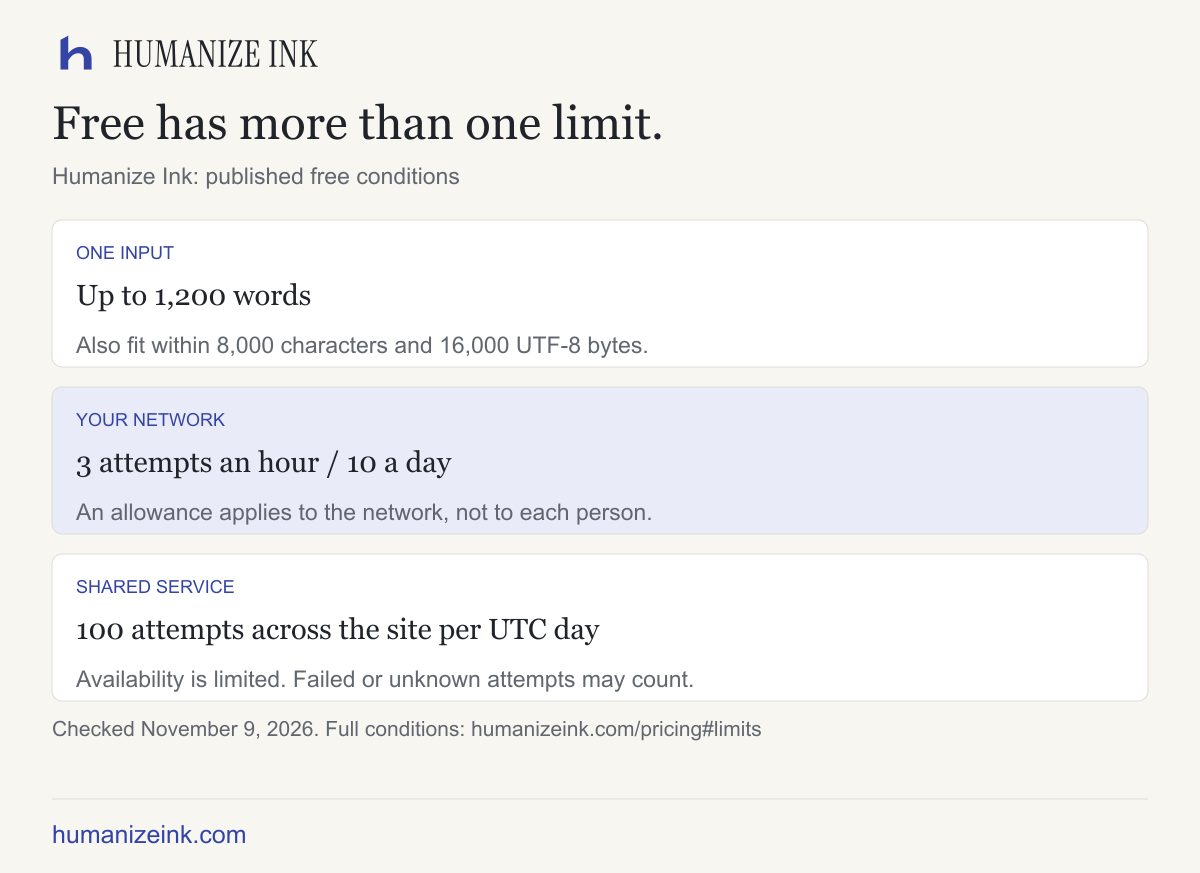
Humanize Ink's English rewriter lets you set tone, rewrite strength and readability, compare the result and edit it before copying. The free limits allow up to 3 attempts an hour and 10 a day per network, with a shared site-wide allowance of 100 attempts per UTC day. Inputs must fit within 1,200 words, 8,000 characters and 16,000 UTF-8 bytes; availability is limited and attempts may count even when unsuccessful. No account is required. Do not submit sensitive information: the rewriting service sends text to a third party, whose handling is explained in the privacy policy.
Scroll to see all columns
| Service | Free access and per-request limit | Useful distinction |
|---|---|---|
| Clever AI Humanizer (cleverhumanizer.ai) | Up to 3,000 words; no fixed monthly allowance, subject to availability | Normal and Clear & Structured styles; optional account for history. |
| Grammarly | Free basic tool; account-based Humanizer agent. Check the allowance for the feature you choose. | Preset writing styles and an established writing workspace. |
| Humanize Ink | No account; up to 1,200 words per input and 3 attempts per network per hour, subject to the other limits above | English rewriting with editable output and a comparison view. |
The recommendations use published features and access conditions checked on November 9, 2026. They are not an output-quality ranking. Check each provider's current terms before you submit text; free limits and availability can change.
Which option should you try first?
For a passage between 1,200 and 3,000 words, Clever's published request size is the more relevant starting point of these options, provided you accept its current privacy terms and availability conditions. That is an input-fit recommendation, not a quality ranking.
If you already write in Grammarly, start by checking the free humanizer in that workspace before adding another service. Its public page distinguishes the basic tool from the Humanizer agent available with a free account; do not assume every agent feature is available in the anonymous tool.
For an English paragraph where you want to inspect changes and edit before copying, Humanize Ink offers those controls without an account. Its smaller input limit and network-based allowance make it more suitable for occasional passage editing than continuous bulk processing. We operate Humanize Ink, so this is a description of our own product alongside other options.
A practical five-minute comparison
Choose one paragraph that contains details you can verify. For example:
The team plans to review the draft on 18 June. The estimate is $240, excluding shipping. The result may change after testing.
This illustration contains a date, an amount, a shipping exclusion and uncertainty. Those details give you something concrete to check after a rewrite. Do not assume that a smooth sentence has preserved all four.
Manual editing examples: a faithful change is “The team intends to review the draft on 18 June.” A risky change would be “The team reviewed the draft on 18 June”: it turns a planned review into a completed one.
- Mark the fixed facts. Highlight “18 June”, “$240”, “excluding shipping” and “may”.
- Use the same passage and comparable settings. If one service offers a light rewrite, use it for the first comparison; record which settings were actually available.
- Read the output alongside the input. Check that an estimate has not become a final price, an exclusion has not become a separate charge, and a possible outcome has not become certain.
- Check the tone in context. Does the revision sound appropriate to the reader? A friendly email and a research abstract have different needs.
- Edit and verify manually. Revisit the source for figures and quotes. Keep the original until you are satisfied that the meaning is intact.
If a tool changes the meaning, fix the text yourself or try a smaller passage. Repeatedly rewriting a mistake can make it harder to notice.
What “free” can mean
A service can be free but still limit words per request, requests per day, access during busy periods, or features behind an account. These are different constraints. A provider might advertise no fixed monthly word allowance and still limit the size of an individual request or temporarily run out of processing capacity.
Before committing a full document, check:
- The maximum words or characters per submission.
- Whether an account or payment information is required for the feature you need.
- Whether daily limits or shared capacity can interrupt a session.
- Whether output can be edited, copied or compared with the original.
- The privacy notice for submitted text and any institutional or client rules.
For a long document, split at paragraph boundaries and review continuity across sections. Keep a copy of the original formatting because some services return plain text.
Is a detector score a measure of accuracy?
A detector result is not a substitute for checking factual accuracy or meaning. An output can sound natural while altering a number, omitting a condition or changing a quotation. If your school, publication or client has rules on AI assistance, follow those rules and disclose use when required.
The useful question is whether the final passage says what you intend, in a voice appropriate to its audience. Make the final editorial decision yourself.
Try a short passage
If you already have an English draft, open Humanize Ink, paste a non-sensitive paragraph, choose your settings and compare the result with your original. Check the details before copying your edited version.
Sources checked on November 9, 2026
- Grammarly AI Humanizer: basic free tool and account-based Humanizer features.
- Clever AI Humanizer and terms: request size, recurring allowance and availability.
- Humanize Ink limits and privacy: our own free workflow and processing terms.
For a closer look at evaluation, read how to compare accuracy. For a longer document, see free unlimited-word claims explained.